
RegLab AI
Automated risk profile and draft justification
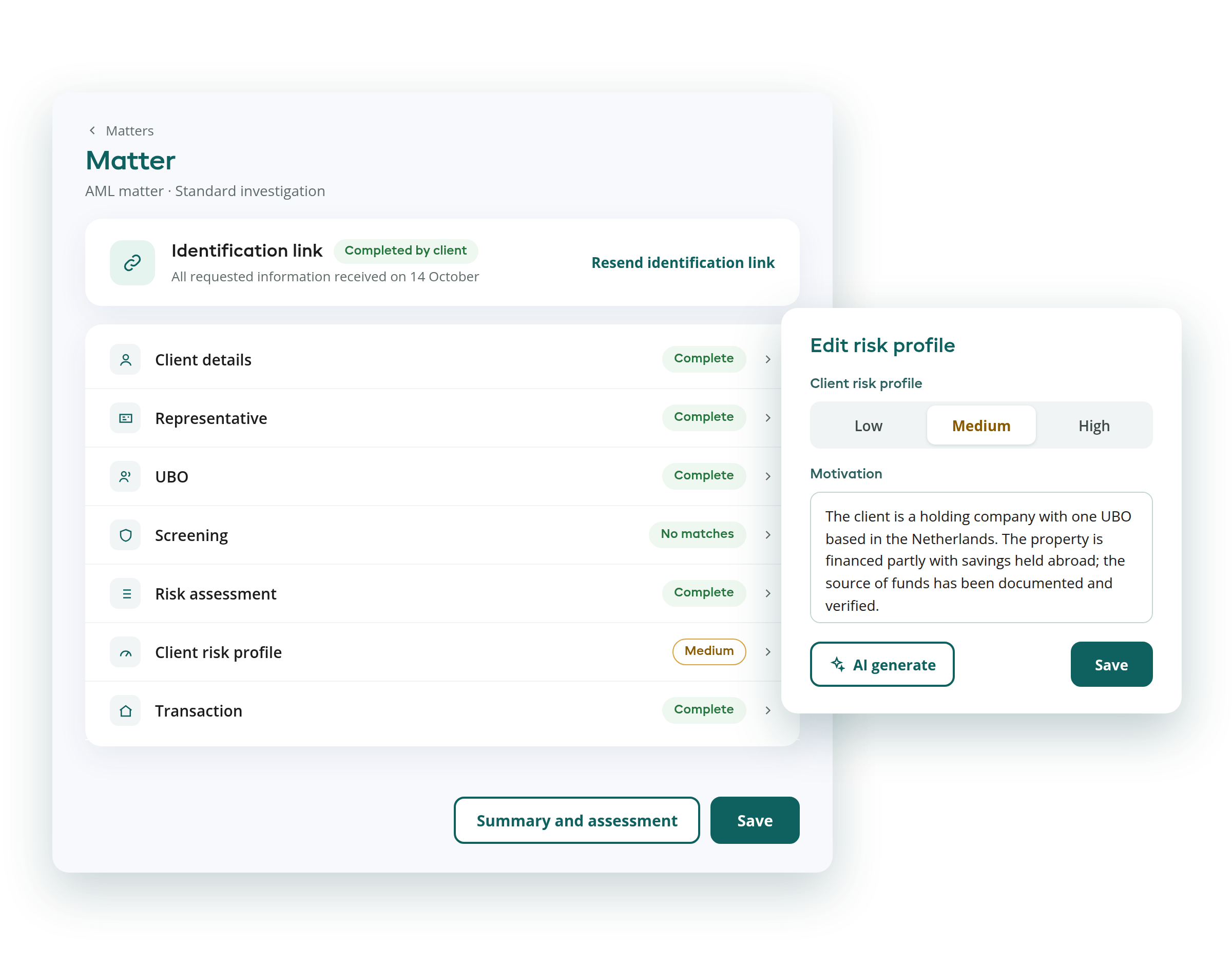
RegLab AI analyses all risk indicators and immediately generates a proposal for the risk profile, including a consistent, well-reasoned justification.
Not to replace your judgement, but so that you can focus on the content, not the format.
The risk profile
Drawing up a risk profile is one of the most time-consuming parts of the AML process. You gather data from multiple sources, weigh up various risk indicators against one another, and then write a justification that must also be consistent with what a colleague wrote yesterday about a similar case.
In small firms, this takes an unnecessary amount of time per case. In larger firms, variations quickly arise: everyone phrases things slightly differently, assesses things slightly differently, which becomes apparent during an inspection by the regulator.
RegLab AI takes care of the groundwork.
What does RegLab AI analyse?
Once the client details have been fully entered, RegLab AI automatically analyses all relevant risk indicators.
Based on this, the AI generates a proposal for the risk profile and a draft justification following a fixed, consistent structure.
The following factors are taken into account:
- PEPs
- Lists of high-risk countries
- UBO structure
- Representative
- Type of legal entity
- Group activities
- Name & location
- Screening hits
In four steps
How it works
From a fully completed matter to a recorded risk profile. You always retain final responsibility.
- 1Complete the client detailsOnce all the details in the matter have been entered, you can start using the AI feature.
- 2Generate a risk profileWith a single click on the ‘Generate’ button, RegLab AI analyses all risk indicators and generates a proposal for the risk profile, including a draft justification with a fixed structure.
- 3Review and editThe generated text is fully editable before you save it. This ensures you always retain final responsibility.
- 4Save and recordWhen you save, the audit trail automatically records that the risk profile was generated or updated using AI.
What you should know
RegLab AI is a powerful tool, but it is no substitute for your professional judgement.
Every time a risk profile is generated or updated using AI, this is automatically recorded in the audit trail. It is explicitly stated that AI has been used. This ensures full transparency for regulators.
Key points to note
- Screening hits are flagged, but not assessed in detail. Manual verification remains necessary.
- Manual verification is always required. AI supports, but does not replace, human judgement.
- If anything in the matter changes that is relevant to the risk indicators, regenerate the risk profile.
- The template is not customisable, but the generated text is fully editable before saving.
Consistent, well-founded and efficient
Creating a risk profile manually takes time and leads to inconsistencies in the reasoning. RegLab AI provides a fixed structure and consistent reasoning for every case. You remain in control; the AI takes care of the groundwork.
This allows you to work faster, more consistently and with better-supported reasoning. And that is exactly what regulators expect.
AMLR: one step ahead
The AMLR raises the bar
Let's look together at what this means for your firm.

“Compliance requirements are becoming increasingly complex. So you need a tool that is not only accurate, but also user-friendly. RegLab ticks all the boxes.”
Frequently asked questions about the automated risk profile
Can't find your question? Feel free to ask it during the discovery call.
What does RegLab AI do for the risk profile?
RegLab AI analyses all risk indicators in the matter and generates a proposal for the risk profile, including a draft justification with a fixed, consistent structure.
Which risk indicators does RegLab AI analyse?
Among other things:
- PEPs;
- lists of high-risk countries;
- UBO structure;
- representative;
- type of legal entity;
- group activities;
- name and location;
- screening hits.
Does RegLab AI replace my own judgement?
No. AI supports, but does not replace, human judgement. Screening hits are flagged, but not assessed in detail, and manual verification is always required.
Can I edit the generated text?
Yes. The generated text is fully editable before saving. The template itself is not customisable.
Can the regulator see that AI was used?
Yes. Every time a risk profile is generated or updated using AI, this is automatically recorded in the audit trail. It is explicitly stated that AI has been used.
How can I use RegLab AI?
This feature is available on request and can be activated on a per-firm basis. Schedule a discovery call to discuss the options.
Read more in the knowledge centre
Ready to use RegLab AI for your risk profiling?
This feature is available on request and can be activated on a per-firm basis.
No obligation · 30 minutes · via Microsoft Teams